Kriti Robertson is an independent business marketing consultant based in Hong Kong. She works with a small, capped roster of business owners who are tired of agencies that sell tactics before they have a strategy. Her work covers marketing strategy, organic SEO and a 14 day Local SEO Sprint for businesses that need customers now.
Can Adding More Pictures Increase SEO? 7 Proven Checks Before You Upload Another Image
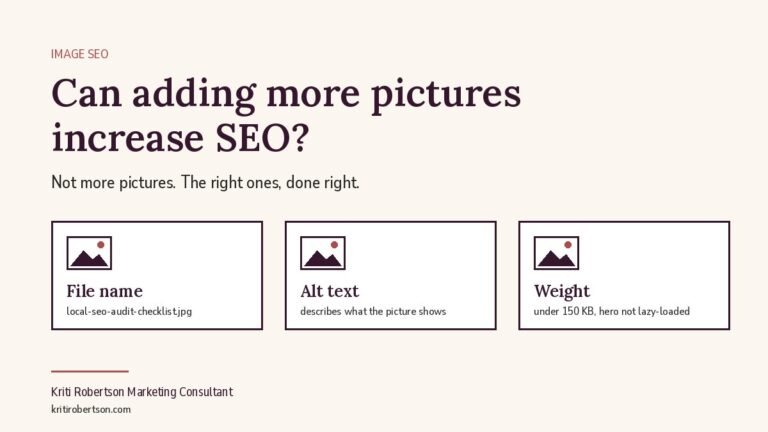
Can adding more pictures increase SEO? Not by itself. I get asked this at least once a month, usually by a founder whose agency has just proposed “more visual content” as a line item, and the honest answer is that the number of images on a page has never been a ranking factor. What moves rankings is whether the right images are on the page, whether Google can read them, and whether they load fast enough to avoid dragging your Core Web Vitals down. Add ten unoptimised stock photos to a service page and you will make it slower, heavier and no more relevant. Add one original diagram with a descriptive file name and alt text, placed next to the paragraph it explains, and you have given Google a second way to understand the page and a second place to show it. The question is not how many. It is which, and how.
I run Kriti Robertson Marketing Consultant, a one-woman full-stack consultancy, and image decisions sit inside my SEO work rather than off in a design silo. Here is how I answer the question when a client asks whether adding more pictures will increase SEO, what the data says, and the checks I run before a single new image goes live.
What Google actually rewards in an image
Google does not count pictures. It reads the signals around them. The file name tells it what the image is before it opens it. The alt text tells it what the image shows and gives screen readers something to say. The surrounding text and the heading above it tell it why the image is on this page at all. Structured data tells it whether the image is a product, a recipe, an article thumbnail or a logo. And the image’s dimensions, format and weight tell it how expensive the page is to render on a phone. Every one of those is a decision you can make well or badly. An image that gets all five right pulls its weight. An image that gets none of them right is a liability that happens to look nice.
So when someone asks me whether more pictures increase SEO, I translate the question into the one that matters: does each image on this page earn its place by adding relevance, comprehension or discoverability, without costing speed? If yes, keep it. If no, it goes, however much the design team likes it.
The data: images are both your biggest speed risk and a growing search channel
Two numbers frame this properly. First, speed. The HTTP Archive’s 2024 Web Almanac found that on 73% of mobile pages, the Largest Contentful Paint element is an image, and the figure is around 83% on desktop. Largest Contentful Paint is the Core Web Vital that measures how long the main content takes to appear, and it is the one most sites fail. In plain terms, on roughly three out of four pages, the single thing deciding whether you pass or fail Google’s main speed test is a picture. The same report found that 16% of mobile pages still lazy-load that hero image, which delays the very element Google is timing. Adding pictures carelessly does not just fail to help. It actively pushes the one metric that most often hurts.
Second, discovery. Google reported in October 2024 that Google Lens now handles nearly 20 billion visual searches every month, and called Lens one of the fastest growing query types on Search. That is people pointing a camera at a product, a storefront, a menu, a piece of furniture, and asking Google what it is and where to get it. If your images are original, well described and tied to a page that answers the question, you can appear in that stream. If they are generic stock images shared by ten thousand other sites, you cannot. Nobody searches Lens for a smiling woman in a headset.
Put those two facts together and the answer sharpens. Pictures can increase SEO when they are treated as content and as a performance budget at the same time. Most businesses treat them as decoration, which is why most businesses get nothing from them.
When adding more pictures hurts
I see the same four mistakes on almost every audit. The first is weight. A 4 MB photo straight off a phone, uploaded at full size and scaled down by CSS, will cost you seconds on a mobile connection. The second is stock photography. It adds nothing Google can use, it adds nothing a reader learns from, and it frequently duplicates images found on competitor sites. The third is text baked into images: a pricing table or a process diagram saved as a JPEG is invisible to search and to anyone using assistive technology. The fourth is lazy-loading everything, including the hero, because a plugin turned it on globally. That last one is the quiet killer behind the Almanac statistic above.
There is a fifth, which is less technical and more cultural. Agencies tend to measure design output in volume. More banners, more carousels, more icons, more “visual interest”. The brief never says which images will improve a specific page’s ability to rank for a specific query. It says the page needs to look more engaging. When a client asks me if adding more pictures will increase SEO, what they usually mean is “my agency proposed this and I want to know if it is real work.” Sometimes it is. Often it is a billable afternoon with no measurable outcome attached.
When pictures help
Original images help. A photo of your actual premises, your actual team, your actual product on an actual customer’s desk. Diagrams that explain a process better than three paragraphs could. Screenshots of real results, with the numbers legible. Before-and-after shots for any trade where the work is visible. Product shots from several angles with consistent backgrounds, which matters enormously if you ever work with an ecommerce SEO consultant, because product image quality feeds directly into Google Shopping and Lens results.
These images help in three ways. They give Google Images and Lens something unique to index. They keep readers on the page longer, because a reader who understands a concept faster stays to read the next section instead of bouncing back to the results. And they support the page’s topical relevance, because a descriptive file name, alt text and caption are three more places the page says, in plain language, what it is about. One well-placed diagram on a 1,500-word guide typically does more than five generic photos spread through the same guide, because the diagram is the thing someone might search for and the photos are not.
The image audit I run before anything gets uploaded
This is the same seven-point check I use on client sites, and it takes about an hour per page the first time. Point one: does the image have a reason to exist on this page? If I cannot write one sentence explaining what the reader learns from it, it is cut. Point two: the file name. “IMG_4821.jpg” becomes “local-seo-audit-google-business-profile-checklist.jpg”, written as a human would describe the picture, not stuffed with keywords. Point three: alt text that describes the image for someone who cannot see it, and naturally includes the page’s topic where the picture genuinely shows it. Point four: dimensions and format. I export at the largest size the layout will actually display, usually 1200 pixels wide for a blog hero, in WebP or AVIF, and I set explicit width and height attributes so the browser reserves space and nothing shifts while loading.
Point five: weight. Under 150 KB for a hero, under 80 KB for anything inline, with a compression tool in the publishing workflow rather than left to the writer’s memory. Point six: loading behaviour. The hero image is not lazy-loaded and gets fetchpriority set to high, which WordPress has supported natively since 2023. Everything below the fold is lazy-loaded. The Almanac found that adoption of this one attribute jumped from almost nothing in 2022 to 15% of mobile sites in 2024, largely because WordPress added it by default. If your theme or page builder has switched it off, that is a two-minute fix with a measurable payoff. Point seven: context. The image sits directly beside the text it illustrates, under the heading that names the topic, with a caption where one helps. Google reads the neighbourhood, not just the file.
Run those seven checks and the question “can adding more pictures increase SEO” answers itself. Every image that passes is an asset. Every image that fails was never going to help, no matter how many of them you added.
The local business version: your photos are already being judged
For brick-and-mortar operators the most important images are not on your website at all. They are on your Google Business Profile. I scored a client’s profile recently and their reviews came out at four out of five on my scoring: high volume, strong ratings, genuinely excellent. Then I scored the rest of the profile. Wrong primary category, no posts, no products listed, zero keyword alignment, and photos that were two to six years old. Total score: 26 out of 60. It is a pattern I see constantly. Business owners assume reviews are the whole game, so they get complacent the moment the star rating looks good. Reviews build trust once someone is already looking at you. They do nothing to help someone find you in the first place, and they do nothing to stop a customer forming a view from a six-year-old photo of a shopfront that has since been repainted.
Fresh, specific photos on a profile are one of the few things a local business can change in an afternoon that visibly affects how the listing performs in the map pack and in Lens. Interior, exterior, team, products, work in progress, uploaded monthly rather than once at setup. This is exactly the kind of fix I build into the Local SEO Sprint, the fixed-fee 14-day Google Business Profile intensive I run for four businesses a month, because it is fast, it is cheap relative to the result, and almost nobody has done it properly.
Where the agency model breaks on images
Images fall between departments in an agency. The designer makes them. The developer uploads them. The SEO person, if there is one, gets a monthly PDF of rankings and never opens the media library. Nobody owns the question of whether the images on page three are the reason its Largest Contentful Paint is 4.8 seconds. I have audited sites where the content team had written 40 strong articles and the design team had put a 2 MB uncompressed hero on every one, so the whole blog failed Core Web Vitals and nobody noticed because each department’s report looked fine on its own.
That is the structural reason a business marketing consultant who works across the full stack catches things a channel-siloed retainer will not. When the person writing the strategy is the same person checking the media library and the same person reading the speed report, the image question gets answered once, correctly, and built into the publishing checklist. There is no handoff for it to fall through.
How images fit the rest of your SEO
I want to be clear about proportion. Images are a supporting signal, not the foundation. If your pages do not match search intent, if your site has no authority, if your internal linking is a mess, fixing images will not rescue you. An organic SEO consultant worth the fee will put images fourth or fifth on the priority list, after intent, content quality, technical health and internal links, and will tell you so. But once those are in order, images are one of the cheapest remaining wins, especially for the small business SEO services bracket where competitors are typically running stock photos and 3 MB heroes and have never heard of fetchpriority.
For businesses competing locally, a local SEO consultant will tell you the profile photos matter more than the website photos, for the reasons above. For businesses selling physical products, image quality and consistency are a ranking input in Shopping and Lens, not just a conversion input. For B2B service businesses, original diagrams and screenshots are the images worth investing in, because they are the ones that get picked up in image search and cited by other sites. Where images sit in your plan should come out of the whole-funnel view a marketing strategy consultant takes, not out of a design team’s view of what looks sparse.
If you want this handled as part of the whole system rather than as another siloed task, that is what a full stack digital marketing consultant does: SEO, paid and automation under one person, with image hygiene built into the publishing process so it never becomes a separate project. If you want the fast, fixed-fee version for a local listing, that is the Sprint.
Can adding more pictures increase SEO? The short version
More pictures do not increase SEO. The right pictures, named, described, compressed and placed correctly, do, and a careless hero image can cost you the single most common Core Web Vitals failure. Treat every image as content with a performance budget, run the seven checks before uploading, keep your Google Business Profile photos current if you serve a local area, and stop paying for volume. I will audit your images alongside everything else in week one and tell you exactly which ones are helping, which are hurting, and which were never going to matter.